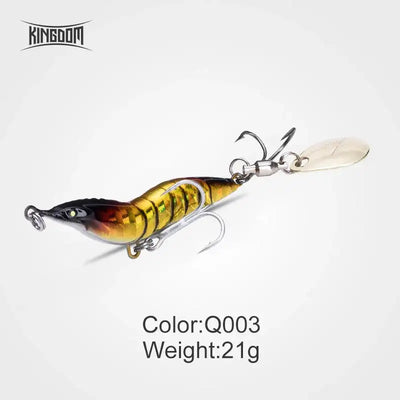
The Kingdom Shrimp Spinner Lure combines a lifelike shrimp shape with a rotating metal blade that flashes and vibrates during the retrieve. Its sinking design helps you work different water depths, while the compact metal body casts easily and tracks steadily.
Features
Realistic shrimp profile with textured finish
Rotating spinner blade creates flash and vibration
Sinking action for controlled depth fishing
Durable metal construction for repeated use
Sharp hook system for dependable hook-ups
Suitable for casting and retrieving in rivers, lakes, estuaries and coastal water
Choose the weight and colour to match the conditions, let the lure sink to your chosen depth, then vary the retrieve to make the blade work. A useful option when fish respond to a compact bait profile with extra flash.
Suggested target species: Bream, flathead, bass and estuary perch, using a weight suited to the depth and tackle.
Colour guide
All four finishes are listed in 8.5g, 14g, 21g and 28g options. Selectable labels combine the colour code and weight, such as Q001-14g.
Q001: Bright reflective gold body with a copper-brown head and back, dark curved abdominal bars and a pale metallic spinner blade.
Q002: Reflective silver body with pink-purple and red head highlights, a dark back, black curved abdominal bars and a pale metallic spinner blade.
Q003: Gold-yellow body with a black head and dark back, reddish-brown shoulder highlights, black curved abdominal bars and a pale metallic spinner blade. Similar to Q001, with a darker head in the supplied images.
Q004: Pearl-white to pale green body with a black head, red accents along the back, black curved abdominal bars and a pale metallic spinner blade. Daylight images do not establish a glow effect.
Specifications
8.5g
14g
21g
28g
Please note: Measurements are approximate. Colours may vary slightly depending on lighting and screen settings.
⚠️ Safety Notice: This product contains sharp hooks and small parts. Handle with care. Not suitable for children under 3 years. Colours may vary slightly from images shown due to screen settings and product availability. Always follow safe fishing practices.
Step 1: Choose message placement
Click the button below and then hover over your page to select a placement.
Step 2: Paste and save
You have copied the placement for the Product Page.
Go back to the App Embeds section, and in the Paypal Advanced Settings, paste the copied value into the
Product Page field and click the 'Save' button in the top right corner.